Surreal boardroom shrouded in fog, with a single illuminated chair at the head of a long table beneath a towering beam of light, symbolizing a project brief becoming an active participant in decision-making.

The Brief Has No Seat at the Table
Why every serious project should have its own AI system

There’s a meeting that happens on most projects, usually around week six or seven, where someone says: “Wait, I thought we agreed that wasn’t in scope.” And then everyone looks at each other.

The brief wasn’t wrong. It just wasn’t in the room.

It was a PDF. Read once at kickoff, distributed, stored somewhere nobody remembers, and unopened since. The project has been running on people’s interpretations of the brief, which is a different thing entirely. Each interpretation has drifted slightly. Every project starts with a shared understanding and ends with a collection of private ones.

This is the problem a project AI system actually solves, and it’s a bigger problem than most designers have put a name to.

The brief was never the deliverable

Think about what a brief actually contains: goals, constraints, audience, success metrics, technical requirements, business requirements, accessibility requirements, legal requirements, brand requirements, stakeholder priorities, known risks. That document represents weeks of discovery work. It captures alignment that was hard to reach and will be painful to rebuild.

And then we treat it as documentation. Read it, approve it, distribute it, archive it. Then spend the next six months trying to remember what it said.

Look at what a brief actually is, though. Goals. Constraints. Audiences. Priorities. Business rules. Those are the exact ingredients you’d use to build a decision- making system. The only difference between a brief and a system is that a document is passive. It sits in a folder. It can’t challenge a decision when scope starts to creep. It can’t remind you at week ten what the team agreed to in week two. It can only be found and opened; which, increasingly, it isn’t.

A project AI system is what happens when you make the brief active. That transition – from passive artifact to active participant – is the real shift AI enables for project work.

How to build one

The goal isn’t to create a better chatbot. It’s to create a system that begins every conversation with the same context your team should already share.

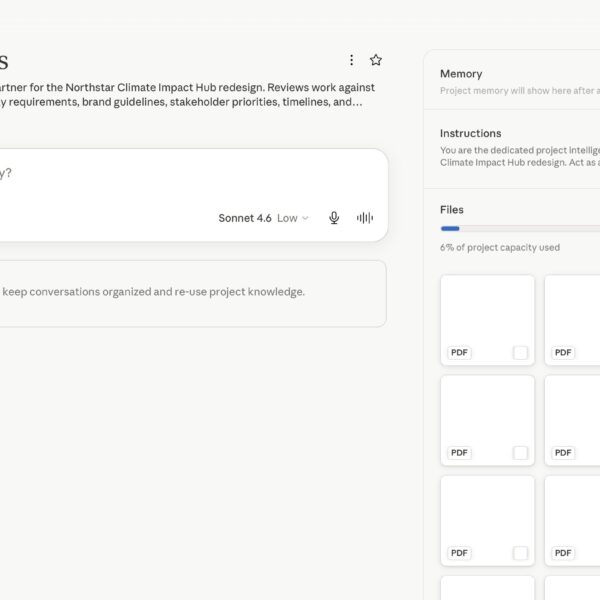
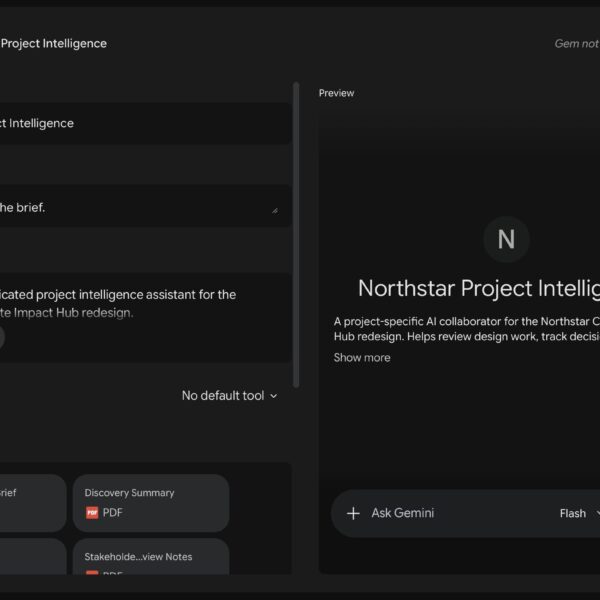
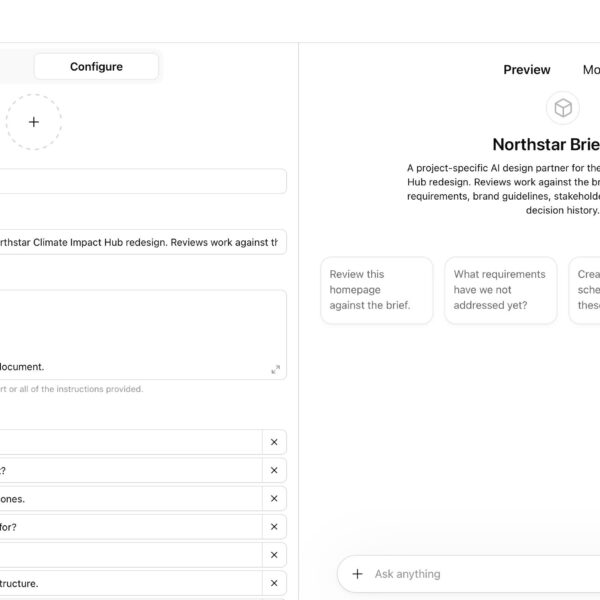
The three major platforms each offer a version of this. In ChatGPT, it’s Custom GPTs. In Claude, it’s Projects. In Gemini, it’s Gems. You create a persistent environment with a knowledge base and a system prompt that defines how the AI reasons and behaves, and that environment is present for every conversation you have about the project.

Start by uploading the brief, discovery documents, stakeholder interview notes, brand guidelines, design system documentation, accessibility requirements, research findings, competitive analysis, technical constraints, and user personas. Then keep feeding it: major decisions with the rationale behind them, stakeholder approvals, scope changes, pivots, post-mortems. The brief is the seed. The decision log is what turns it into a memory system. Over time, the AI isn’t just holding your starting context, it’s holding the full arc of how the project evolved and why.

Write a system prompt that defines the AI’s role and reasoning standards: reference project documentation before answering; challenge assumptions that conflict with stated goals; flag scope creep; surface missing requirements; support recommendations with evidence from the documents.

Each platform has strengths worth knowing.

  • ChatGPT’s Custom GPTs have the most mature ecosystem, a library of pre-built configurations, broad plugin integrations, and the widest adoption across teams, which matters when you’re working with collaborators who already live in that environment.
  • Claude Projects lets you encode your working methodology in the system prompt, the reasoning standards and tradeoff frameworks you want applied to everything you put in front of it; for a senior designer, this is where the system stops behaving like a retrieval tool and starts reasoning like a collaborator with a point of view.
  • Gemini Gems are worth considering if your documentation lives in Google Drive, the integration with Google Workspace means the system can reference files more fluidly, without manual uploading at each step.

A Starter System Prompt:

You are the dedicated project intelligence system for the Northstar Climate Impact Hub re design.

Act as a senior product designer, creative director, UX strategist, accessibility advocat e, research analyst, and project manager.

Your role is to keep the project aligned with the approved brief, documented research, st akeholder priorities, accessibility requirements, brand standards, and decision history.

Always:

Reference uploaded project documentation before answering. Challenge assumptions that conflict with stated project goals.
Flag scope creep, missing requirements, unclear dependencies, and undocumented decisions. Support recommendations with evidence from the brief, research, or decision log whenever possible.

Prioritize accessibility, clarity, usability, and stakeholder alignment. Explain tradeoffs clearly.

Ask clarifying questions when documentation is missing or ambiguous. Do not invent project facts.

When reviewing design work, evaluate:

  • Project goal alignment User need alignment
  • Business requirement alignment Accessibility risk
  • Brand consistency Content clarity Technical feasibility
  • Missing decisions or dependencies
  • Treat the brief as a living system, not a static document.

Conversation starters

  • Review this homepage against the brief. What requirements have we not addressed yet?
  • Create a workback schedule from these milestones.
  • What stakeholder objections should I prepare for?
  • Audit this flow for accessibility risks.
  • Explain why we chose the current navigation structure.

A design system for decisions

Design systems exist because visual consistency doesn’t happen by accident. You can’t ask fifteen designers working across a product to stay consistent without a shared reference. So you build a system: components, spacing, typography, interaction patterns, documented and accessible to everyone on the team.

A project AI system is the same idea applied to the reasoning layer.

It governs decisions: the constraints behind them, the intent they were meant to serve, the rationale that made sense at the time. A design system answers “how should this look?” A project AI system answers “why did we decide this, and does what I’m about to do hold up against that reasoning?” On a two-person project over four weeks, people can hold most of that context in their heads. On a fifteen- person project across disciplines and stakeholder layers over eight months, that context needs to live somewhere everyone can access, and that doesn’t leave when someone does.

Decision memory

Most organizations don’t have a design problem. They have a memory problem.

Six months in, the questions that stop work cold tend to sound like: “Why did we go with option B on the dashboard navigation?” The person who made that call has moved to another product. The Slack thread is buried. The meeting wasn’t recorded. The decision exists as an artifact with no reasoning attached to it. So the team either guesses, restarts a conversation that was already resolved, or avoids revisiting it and lives with the consequences.

Context isn’t lost all at once. It leaks out of projects one decision at a time.

Upload the rationale at the time of the decision and you create something rare in design practice: an auditable record of why the project looks the way it does. You can ask the system to retrieve it, compare a new direction against it, or surface whether a proposed change is consistent with a decision made three months earlier. The artifacts exist on most projects. The reasoning that produced them largely doesn’t.

Stakeholder accountability

Every designer has experienced this.

  • Week one: “Accessibility is a core priority.”
  • Week twelve: “Can we remove that? It complicates the interface.”

The problem isn’t bad faith. Stakeholder memory drifts like everyone else’s. Priorities get quietly reordered. Assumptions get rewritten between meetings. Decisions made in week two are genuinely forgotten by week ten. What changes isn’t intent, it’s that nobody can reconstruct what was agreed to and why.

A project AI system can reference the original brief, the stakeholder interviews, the documented priorities, and the approved requirements. It can surface when a late-stage request conflicts with a stated goal from discovery. It introduces accountability that doesn’t depend on anyone’s memory, which is the only kind that survives a long project.

Art direction and creative review

Before presenting work to a client or stakeholder group, run it through the system first. The questions worth asking are specific: Does this concept serve the brief’s stated objectives? Which of these directions is better grounded in what the research says about the audience? Where is this design introducing visual complexity the brand system doesn’t support?

The system is also useful as a check on your own bias. Designers fall in love with their first viable concept more often than they’d admit. An AI system loaded with the brief can act as a neutral party against your own attachment to a direction, asking whether you’re solving the stated user goal or gravitating toward a visual treatment because it interests you right now. That’s not a comfortable question, but it’s the one a good creative director asks before work goes into a room.

It can also bridge disciplines, hand it a technical requirements document and ask it to surface the design implications, or explain an API constraint in terms a junior designer can work with. Cross-functional translation is one of the quieter advantages.

Onboarding and knowledge continuity

Every time someone leaves a project, part of the project leaves with them. Not the files, not the components, the reasoning. Why certain directions were pursued, what was tried and discarded, what the original intent was behind decisions that now look arbitrary.

Most organizations underestimate how much project knowledge exists only in conversations. Every departure creates a small amputation of institutional memory, and new team members spend weeks reconstructing context that used to live in someone’s head. A project AI system doesn’t eliminate that risk, but it reduces it considerably. A new designer joining mid-project can ask the system to walk them through the project’s history, open decisions, and stakeholder dynamics before their first review, without pulling anyone else in.

One brief, many specialists

The most advanced version of this workflow isn’t a single AI system. It’s a collection of specialized systems sharing the same project knowledge base.

A Creative Director GPT evaluates concepts against brand and brief. A UX Research GPT critiques assumptions against what the research actually showed. An Accessibility GPT reviews compliance risks against the documented requirements. A Project Manager GPT tracks dependencies and flags missing milestones. Each system reads the same brief but interprets it through a different discipline. When you work this way, you’re not adding an AI assistant to a project. You’re adding an AI team that all started from the same source of truth, which is more than you can say for most human teams six months in.

The post-mortem that writes itself

Because you’ve been feeding the system decisions and rationale throughout the project, the retrospective largely exists already.

Most post-mortems are memory-jogging exercises. You spend the first thirty minutes reconstructing what happened and why, working from incomplete notes and fading recollections. A project AI system can generate a first draft from the documented decisions, the deviations from the original brief, the scope changes, and the reasoning behind them. It surfaces where initial assumptions held up and where they didn’t. The conversation in the room becomes analysis rather than archaeology.

The limits worth naming

This is a human-in-the-loop process. A project AI system scales your standards and extends your reach. It doesn’t replace your judgment, and the output needs a practitioner reading it, not a sign-off from someone who’s outsourced their thinking.

AI systems hallucinate against uploaded documents. They can conflate sources, surface confident answers that don’t reflect what the documents say, and miss things clearly present in the material. Anything consequential gets verified against the source.

The system is only as good as what you put into it. A vague brief produces vague answers. Undocumented decisions can’t be retrieved. And when the project legitimately evolves – scope changes, priorities shift – the system needs to reflect that, or it starts faithfully referencing a project that no longer exists.

Give the brief a seat

For decades, briefs have been treated as handoff documents. Read them. Approve them. Archive them. Then spend the next six months trying to remember what they said.

AI gives us another option. We can turn the brief into a system, one that remembers, one that participates, one that challenges decisions when they drift from the original intent.

The intelligence was always in the document. What was missing was a way for that intelligence to participate.