
Side profile of a humanoid AI figure with glowing internal circuits and trailing wires, silhouetted against a twilight sky.

Users Who Never Sleep

Why AI agents are a new audience, and what they demand from our tools

There’s a new kind of user inside your product. It doesn’t click. It doesn’t swipe. It doesn’t sleep.

It retrieves data, takes actions, routes tickets, calls APIs, and hands things off to its human teammates, sometimes without ever touching the UI.

We’re talking about AI agents: autonomous systems built on large language models that don’t just assist users, but act on their behalf. They’re starting to show up in enterprise workflows, customer experience tools, design systems, and internal platforms—and they’re changing everything.

What does it mean to design products where your users are human and machine?

Designers are no longer just building for human interaction. We’re building systems for users who never sleep, agents who execute tasks, make decisions, and collaborate in invisible ways. And that shift is already reshaping how we think about UX, infrastructure, instructions, and trust.

🧠 What AI Agents Are (and Aren’t)

Here’s how to think about the different categories of AI interaction:

Chatbots: React to scripted flows and FAQs. They’re useful for basic interactions like “What’s your return policy?” but break when asked anything unexpected.

AI Copilots: Respond to direct user prompts. They can generate text, write code, or suggest designs, but don’t act independently.

AI Agents: Take action on your behalf. They handle multi-step workflows like issuing refunds, updating CRMs, or generating reports. They use LLMs for reasoning but add planning, memory, and real-world tool use.

In short: Chatbots answer. Copilots assist. Agents act.
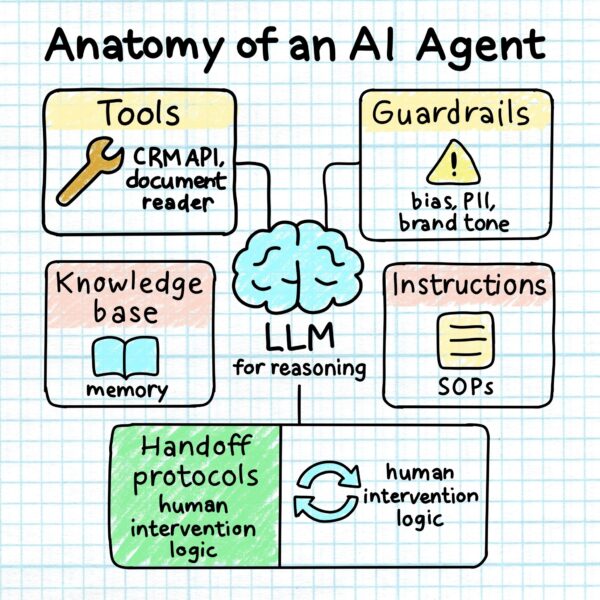
Hand-drawn systems diagram centered on a brain icon labelled ‘LLM for reasoning,’ surrounded by five labelled boxes: Tools, Guardrails, Instructions, Knowledge Base, and Handoff Protocols

Behind every AI agent is a system of tools, rules, and reasoning: LLMs for decision-making, APIs and documents for tools, SOPs for instruction, memory for context, and guardrails to keep it aligned with brand, law, and ethics.

🔍 Personal vs Company Agents

As you design, consider whether your agent acts as a personal assistant, adapting to a single user, or a company-wide teammate, operating across users with shared data and policies.

Organizational agents raise new questions: Who has access to what data? How are actions audited? What happens when something goes wrong?

These influence everything from permissions to interface trust.

🧩 Designing With Agents vs Designing For Agents

Using AI to draft copy is one thing. Designing systems agents operate in is another.

This means:

  • Defining agent roles and escalation logic
  • Anticipating error states and fallback flows
  • Designing for both human and machine interactions
  • Treating workflows and reasoning paths as part of the product

You’re not just shipping pixels. You’re shaping automation.

🧠 Where Product Designers Should Be Looking

1. Agent Instruction Design

Prompts are basic. Instructions are operational. Good agent design starts with clear instructions:

  • What to do when context is missing
  • When to escalate to a human
  • How to phrase uncertainty

You’re not designing a voice. You’re designing a playbook.

2. Human–Agent Collaboration UX

When agents hit a wall, users need transparency and control.

Design for:

  • Seamless handoff to humans
  • Clear explanation of failures
  • Trust-building through transparency

If the user experience is a relay, the agent is the first runner. Your job is the handoff.

3. Agent Teams: The New Design System

Agents work in teams—Billing Agent, Returns Agent, Supervisor Agent.

Designers need to map:

  • Who owns each part of a task
  • How agents coordinate
  • What happens when things go sideways

Should you use a manager-style orchestrator agent or a peer-to-peer swarm model? Each shapes the UX differently.
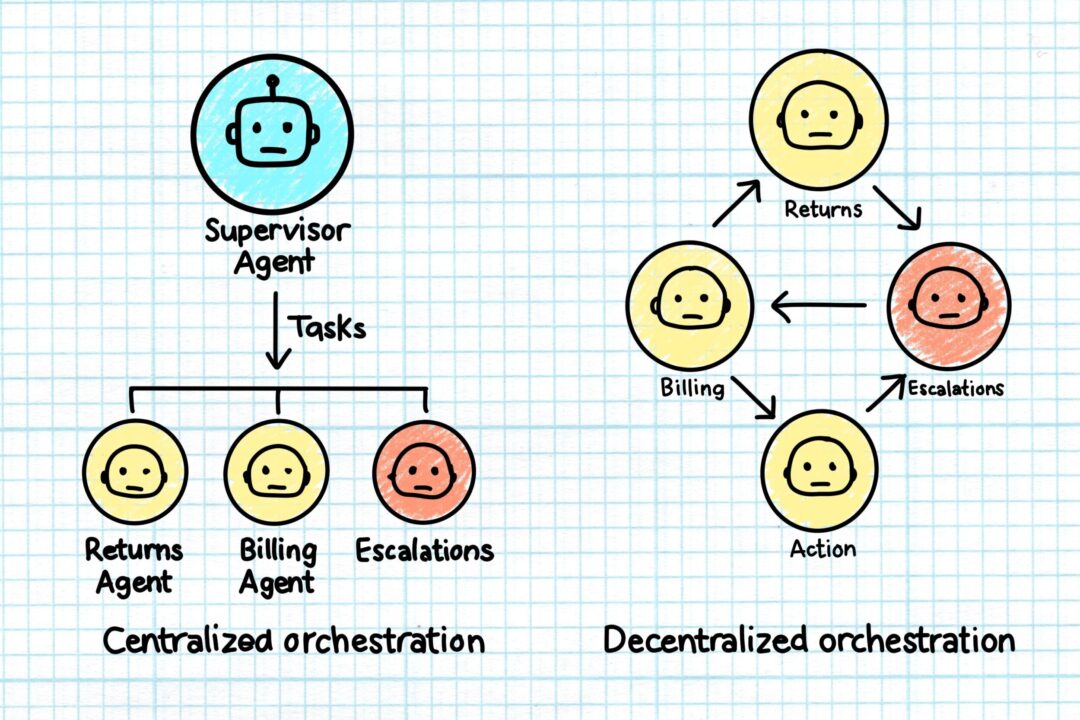
Split-panel hand-drawn diagram. Left shows a Supervisor Agent delegating tasks to Returns, Billing, and Escalations agents in a top-down structure. Right shows the same agents routing tasks among themselves in a decentralized loop.

Centralized and Decentralized Models

Looking ahead, expect teams of agents to coordinate among themselves to handle increasingly complex, multi-step workflows with minimal human input.

4. Domain-Specific Design for Specialized Agents

Specialized agents don’t just need access to the right data. They need workflows tailored to business context.

  • A support agent needs empathy logic.
  • A finance agent needs audit precision.
  • A logistics agent needs timestamp accuracy.

Deep domain knowledge is becoming a design advantage.

5. Guardrails as UX

Designers are now defining the limits, what agents can’t say or do.

This includes:

  • Ethical constraints
  • Bias mitigation logic
  • Data handling boundaries

These aren’t backend problems anymore. They’re experience problems.

6. Observability and Feedback

Agents make decisions. Sometimes they’re wrong.

Design observability tools that reveal:

  • What the agent did
  • Why it did it
  • How to fix it next time

This benefits users, support teams, and compliance alike.

7. Platform Foundations: Accuracy, Efficiency, Governance

Every agent workflow lives or dies by three things: Accuracy, efficiency, and governance.

That means designers must understand:

  • Structured vs. unstructured data (e.g. CRM fields vs. PDFs)
  • Retrieval limitations and latency
  • Data lineage and explainability
  • Access controls and escalation paths

    UX doesn’t stop at the interface. It includes infrastructure.

🧱 Design + Data + Deployment

Agentic design requires collaboration across disciplines.

Designers must now partner with:

  • Data teams (to define access and structure)
  • Legal and compliance (to establish guardrails)
  • Support and CX (to guide escalation paths)
  • Engineering and IT (to build and maintain observability)

This is not handoff work. It’s shared ownership.

🚀 Launching Is Just the Beginning

Deploying your first agent is just the start.

At scale, teams need to:

  • Continuously evaluate performance
  • Update instructions as tasks evolve
  • Monitor outputs for drift or risk
  • Adapt tooling and transparency as agents grow more capable

Agents don’t just ship. They evolve.

🏭 Where It’s Already Happening

AI agents are transforming industries:

  • Finance: forecasting, claims processing
  • HR: policy queries, benefits comparisons
  • Operations: logistics and inventory optimization
  • CX: issue triage, automated resolution, proactive support

Wherever there’s structure, scale, or repetition—agents are moving in.
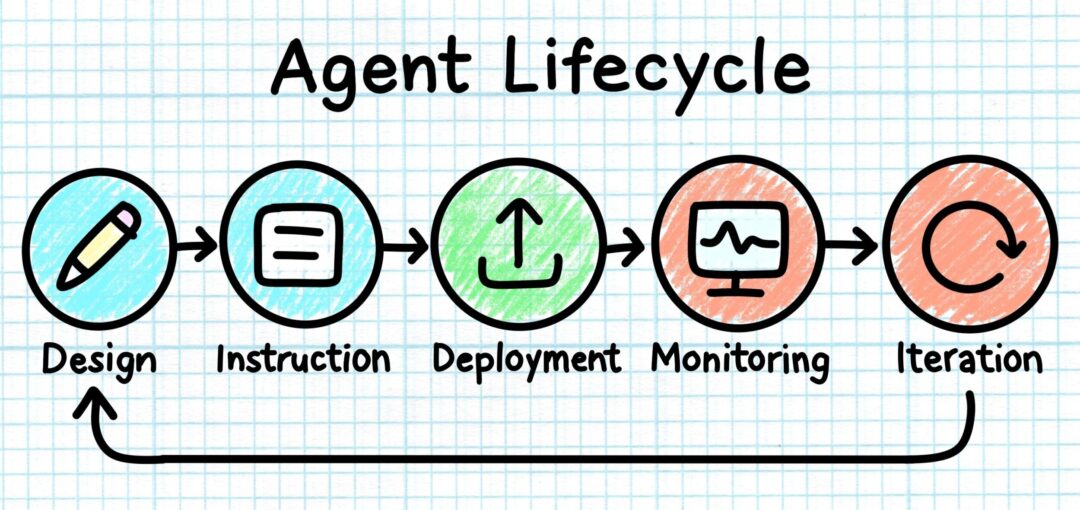
Hand-drawn horizontal diagram showing five coloured icons in sequence: Design, Instruction, Deployment, Monitoring, and Iteration. A looping arrow connects Iteration back to Design.

From initial design to ongoing iteration, AI agents aren’t a one-and-done launch. They require active monitoring, feedback, and adjustment to stay effective and trustworthy.

📈 Why This Matters Now

  • Only 10% of large enterprises use AI agents today
  • Over 50% plan to adopt in the next year
  • The market is projected to exceed $47B by 2030

This isn’t a trend. It’s the new foundation.

🛠 TL;DR: What Designers Need to Do

✅ Learn how agent systems reason and operate
✅ Design for agents as users, not just tools
✅ Write clear, role-aware instructions and constraints
✅ Embed guardrails, escalation, and observability
✅ Collaborate across compliance, data, and engineering
✅ Treat workflows, systems, and infrastructure as part of UX
✅ Plan for performance monitoring and iteration

🔁 Final Thought

AI agents aren’t just tools. They’re users. And like every user, they need clarity, trust, boundaries, and great design.